Showing posts with label digital paint. Show all posts

Thursday, June 5, 2014

Digitally Painted Dachshund

Hi there!

This time I want to share with you my latest work - A digitally painted portrait of a Dachshund.
It's just a little taste of my Dog Art. In every Portrait I give a contemporary and urban feel, a little edgy and rough touch. I try to make those portraits as lively and vibrant as possible, after all, those pets give us so much joy, aren't they?
You can find many more portraits at my site DigitalDogPortraits.com and to order your very own pet portraits - Satisfaction Guaranteed!

So without further ado, here is Gabi :


Isn't he cute, what do you think?


I created a short video that shows the painting process (of other dog) in high speed - check it out!

Until next time! Have a lovely day :)

Monday, December 2, 2013

The Lizard King - Digital Paint

Hi there,

As I told you in the last post, I am painting a series of different animals (besides dogs), I want to make them exceptional, crazy, fun and funky. This time I painted an optimistic piece of a green lizard resting happily on a rock in a field. The natural scenario accompanied by a bright wonderful day - blue sky and fluffy clouds.
I created the lizard, which some will say: a scary reptile, as a cool and smiling creature.

My initial thought was to create this lizard especially for T-shirts, but it turned out to be quite a beautiful piece, and can easily fit as a wall decoration.

Take a look :

Smiling Green Lizard on a Beautiful Sunny Day Poster

What do you think?

Stay tuned for more surprising art!


Tuesday, November 26, 2013

Funky Giraffe on a Shirt

Hi there,

Lately I've been sketching and painting many portraits, using old media techniques like watercolor, pencils etc. I wanted to create something new and fresh using digital painting. You may have noticed that I am painting a lot of dog portraits, I love it! But I wanted to do something different.

I've visioned a cool Tshirt with a colorful and funny looking giraffe on it, and it felt so right, so I started to work on it. I wanted the giraffe to be cool, I didn't want to use ordinary colors. The portrait is very "urban" and somewhat messy, not the neat portrait that I usually do.

Take a look, isn't it a cool shirt? :)

Vibrant Colorful Giraffe in Orange and Yellow Tee Shirts
Vibrant Colorful Giraffe in Orange and Yellow Tee Shirts by IBadishi_Digital_Art


That's it for now, I intend to work on more funny looking animals, stay tuned!


Friday, August 2, 2013

Citrus. Digitally Painted Still Life

Hi there,

The summer makes me feel so lazy, the heat kills my creativity :P
I can't stand it anymore. The other day it was so unbearable, I just stood there and fantasized about fresh cold orange juice, so refreshing...

Then, I had an epiphany! I should paint some oranges, slices, with all the juices. It was like having a boost of vitamin C. I just went to the computer and start painting some oranges on a kitchen board with my Wacom graphic tablet. All i could think about was orange juice, mojito and mimosa :)

I must say - I LOVE that painting. Refreshing, vibrant and different. I'd put it on the living room (or the kitchen) :)

Take a look :


What do you think? 

If you like it, and want to have a print of this juicy contemporary fruit art, you can get it on my Zazzle shop.

Until next time, take care! 


Tuesday, April 23, 2013

Fluorescent Girl - Digital Paint

Hi there!

Yet another Digital Paint :) This time, a woman's portrait. I wanted to create a sensual and mysterious atmosphere, and to use some fluorescent colors.

This painting started as a simple rough sketch, but those outlines helped me painting the whole portrait.

Take a look at the sketch


Pretty simple huh? I'm not trying to capture all the details, just the general image. Later on, the painting will come to life and I would be able to change or tweak some misplaced lines.

During the painting process, I'm checking some color schemes and backgrounds (it's easy with digital painting :)).

The expression and atmosphere change while I'm painting until I am fully satisfied with the portrait.

Check it out :


I really like the end result :)

If you like it too, you might want to check out the printed version of  "Fluorescent Girl" on my online store.

Have a beautiful day :) See you next time!

Wednesday, April 17, 2013

Digitally Painted Self Portrait

Hi there,

I've created many portraits through the years, but most of them of other people or pets. I wanted to try something different, to digitally paint my own childhood portrait. I decided to use an old black and white photo as a reference.

At first I wanted to sketch the portrait with a pencil and to leave it like that, but I changed my mind and decided to use my Wacom graphic tablet and Photoshop's paint brush. I want to show you some screen captures of the digital painting, and talk about them a little bit.

1. The original photo and the rough sketch


Here is the first step. I took the original black and white photo and sketched it loosely. Usually when I'm starting to create a digitally painted portrait I use Vector Art in order to build the basic image, but in this painting I wanted to try a different approach. At this step the most important thing is to capture the general shape of the face, and the correct position of the eyes, nose & mouth. It's OK if it doesn't look exactly like the original, but I find it easier to work on a well drawn image. The great advantage here, is that you can change almost everything quickly and effectively, as you'll see further on. 

2. Starting to digitally paint the face


As you can see, the face looks a little bit more alive. I took my time and painted the eyes, and the lips. Actually,  the highlights and shadows are the most important thing here. They give us an illusion of 3D, and help the painting to look more "alive". To create the effect I use the burn/dodge brushes and use them in different exposures and range. In this portrait, the light comes from the front so we should paint the highlights in the middle of the face, and the shadows on the sides.

3. Painting the hair


I've painted the hair - nothing special, just simple brown color for now (no tones or other enhancements). I wanted to see the general appearance, later on I'll use the burn/dodge brushes on the hair too. If you'll look closely you'll notice that the face is a bit thinner. I found the face wider than the original photo and decided to trim them, luckily on Photoshop it's easy! And in a few seconds the result was more to my liking.

4. Hair, contrast, some tweaking... and we're done!


We solved the hair issue with some shadows and highlights, it was a pretty easy and quick. Next - I thought that the previous image was too "nice", which means not so exciting. I wanted  the shadows to pop up, to create a dirtier look, more special, so I adjusted the contrast and that did the trick. Some more tweaks : the right eye (our left) - I  balanced the angle a little, and the nose was resized a tiny bit.
I really liked the simple background and the sketchy shoulders, so I decided to leave them like that.

As I said before, sketching and painting with Photoshop (or any other program), gives us the opportunity to try new things, to experiment colors and styles and to correct mistakes fast. That's why I like to use this medium, especially with the graphic tablet.

If you have any question or comment, please write it down.  I'd be happy to read and respond :)

Have a nice day!

Friday, December 28, 2012

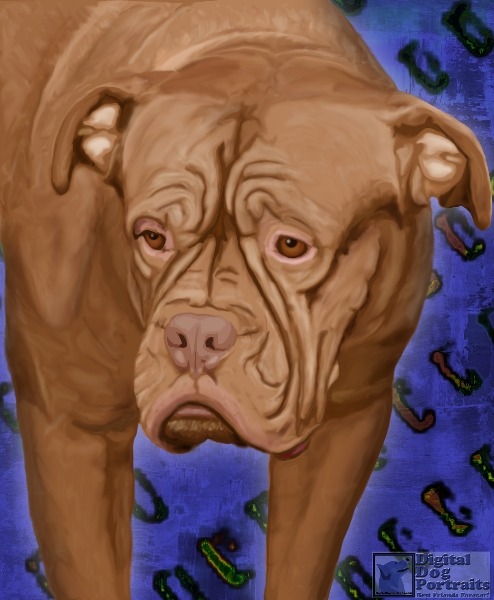
Digital Paint of Dogue de Bordeaux

Hi there!

The other day I was walking on a beautiful Friday morning, checking out a local art fair. Everything was so colorful and lovely, music and laughter were all around. When I was taking a little break I've noticed a beautiful dog, full of character, it's face reminded me an old Tibetan monk :) It was Dogue de Bordeux.
Here is the picture of the same dog from the art fair


I was thinking the whole time... I wish someone would order a portrait of this kind of dog, I really want to paint it! 3 days ago I decided to paint this one for myself, just for the fun and the challenge. I really wanted to paint all those wrinkles and to preserve the character. It took me more or less 12 hours to finish the digital painting. 


I really love the result, it looks exactly as I imagined! I wish that I could show the portrait to the dog's owner.

If you enjoyed the portrait, feel free to share this post. You can see more of my dog portraits on my Digital Finger Paint gallery


Tuesday, December 11, 2012

Painted Dog Calendar 2013

Just wanted to share with you!

I've published a super cool and vibrant 2013 calendar of my digital painted dog portraits. If you like dogs and want to smile the whole year,  you should take a look at it :)


Tuesday, June 26, 2012

Line Art - Happy Dog Portrait

Hi there,

Last post I showed you a Line Art of a Boxer dog. I like to capture dogs' expressions and poses, so I decided to draw some more.
This time I've created a portrait of a mixed breed dog, a happy and energetic creature. I wanted to do this sketch with the good old Photoshop CS2, to do something simple and basic.
Take a look :


To be honest I like to created Line Art images using photoshop. I tend to think that the images are warmer, and look more "human". The fact that I use only lines as a first sketch, and have to paint between the lines, makes the difference. I try to do very clean work, but every now and then, I can miss a pixel, you can't really see it immediately, but you can feel it - and that makes it (in my opinion) more special and warm. This kind of images are never perfect, and I like them more this way. I prefer hand painting the image, than using an immediate color fill (like in illustrator). 
Here is an example of how I fill the colors :


A little primitive, and analog... I know :) In illustrator the process is quicker and easier, I can switch colors immediately and change the lines in seconds... Using photoshop well... it's not :) And If I find an error I have to repaint the whole part, or to rebuild the area. Sometimes it takes a while, sometimes it's frustrating, but as I said before... I think that "feel" is much much better!

Next post we'll see another dog art using photoshop.

Thank you for visiting!

If you'd like to see more of my art, please check out my Online Store or my Facebook page